Card Tips & Fun

No-Carve Disney Pumpkin Ideas: Belle, Maleficent and Cinderella

Belle, Maleficent and Cinderella DIY pumpkins

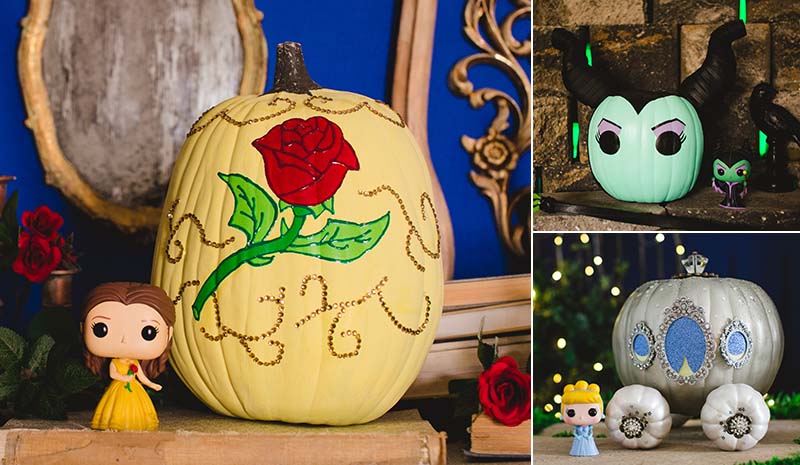
Pumpkins aren’t just for ferrying Cinderella to the ball; they’re also great for getting your kiddos into the Halloween spirit the Disney way! Best of all, everyone can join in the fun with no-carve, kid-friendly designs inspired by Cinderella’s dreamy carriage, a not-too-scary Maleficent, and, of course, the rose and Belle’s iconic gown from Beauty and the Beast. October 31st is rapidly approaching, so ditch the carving knives, grab your paintbrushes, and let’s get started with everyone’s favorite Beauty! As always, Disney® Visa® Cardmembers can redeem Disney Rewards Dollars toward DisneyStore.com purchases.1

Belle of the Pumpkin Patch
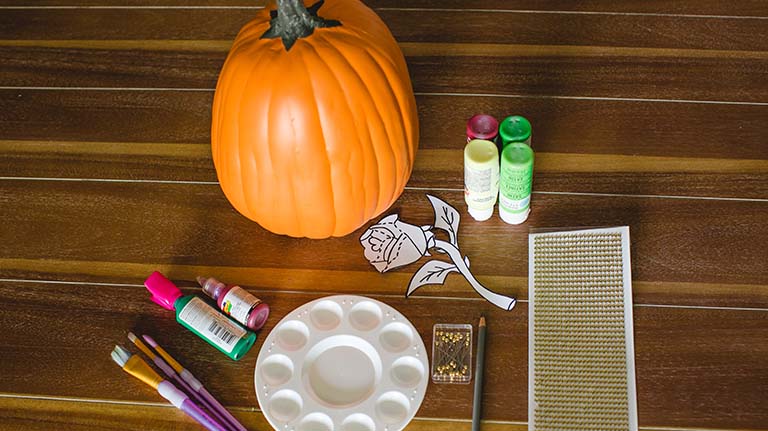
Disney Pumpkin DIY Belle materials
Materials needed:
  • 1 medium pumpkin (to reuse next year, use artificial pumpkin)
  • Acrylic paint: Dark red, light green, grass green, and pale yellow
  • Dimensional paint: Dark red and dark green
  • Provided rose template (click here to download and print)
  • Push pins
  • Pencil
  • Self-adhesive gold rhinestones

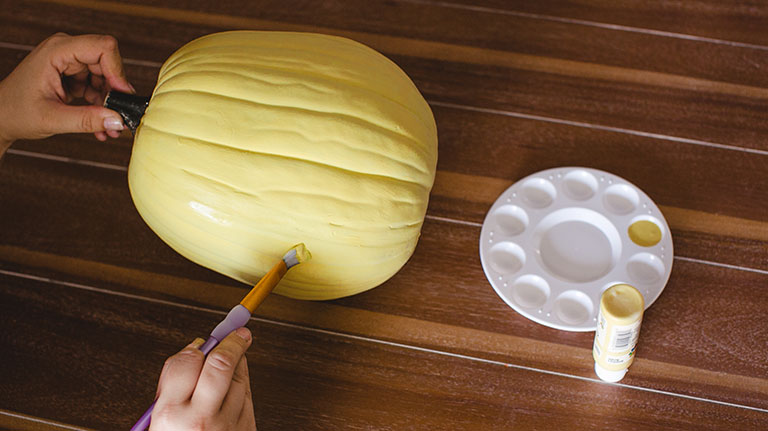
Belle pumpkin step 1

Step 1

Base coat: Paint the entire pumpkin yellow, then allow to dry.
Belle pumpkin step 2

Step 2

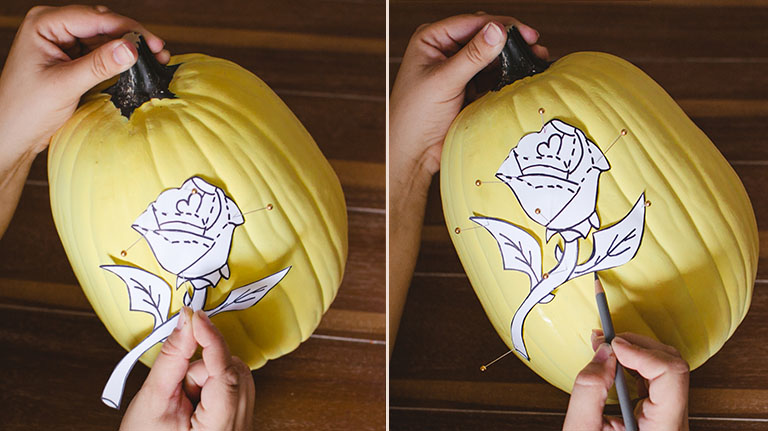
Template 1: Cut out the rose from the provided template and pin it to the pumpkin. Trace with a pencil.
Belle pumpkin step 3

Step 3

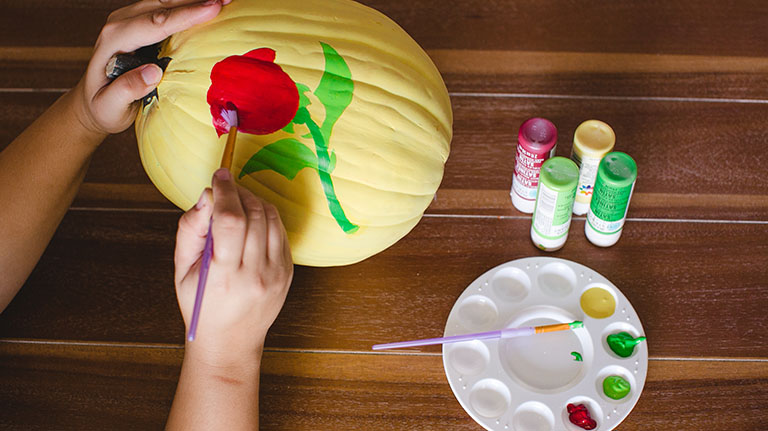
Rose base: Paint the rose head dark red, leaves and thorns light green, and stem dark green. Allow to dry.
Belle pumpkin step 4

Step 4

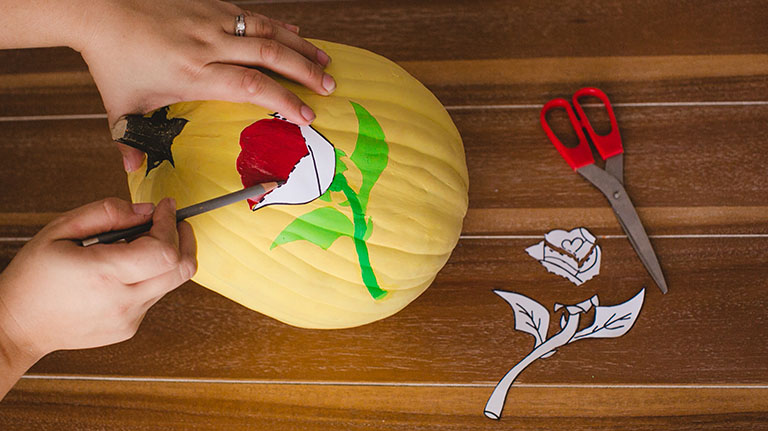
Template 2: Cut the rose template along dotted lines. Trace each section into the rose head with pencil.
Belle pumpkin step 5

Step 5

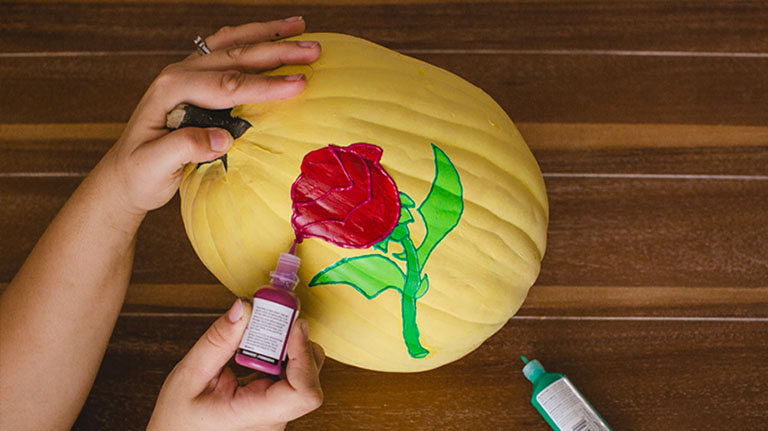
Outline: Outline the new rose lines with dark red dimensional paint, the stem and leaves with dark green.
Belle pumpkin step 6

Step 6

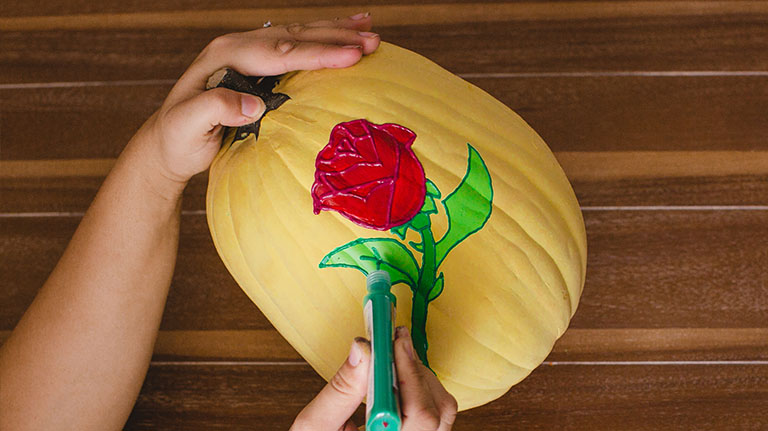
Interior detail: Using dimensional paint, freehand the rose’s interior lines and leaf veins according to the model pumpkin.
Belle pumpkin step 7

Step 7

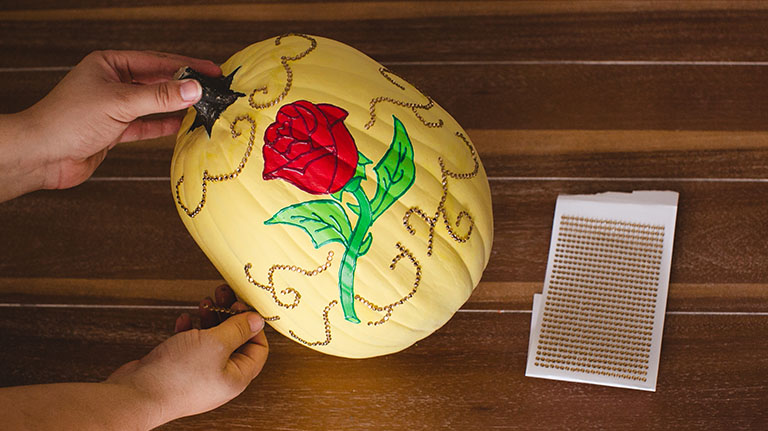
Rhinestones: Place self-adhesive rhinestones on the pumpkin in a swirl pattern, using the model pumpkin as a guide.
Belle pumpkin

Step 8

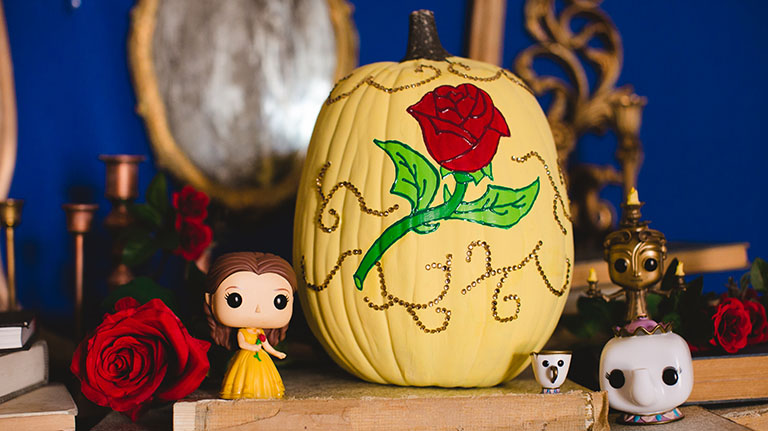
Display: Put the pumpkin on a pedestal and surround with some of your favorite Beauty and the Beast products from DisneyStore.com. Now you’re ready to show off your creation in your castle’s West Wing!

Cinderella’s Carriage

Put the “Boo” in “Bibbidi-Bobbidi-Boo”! Convert your very own unassuming gourd into a glistening carriage headed for Halloween fun (no wand required).
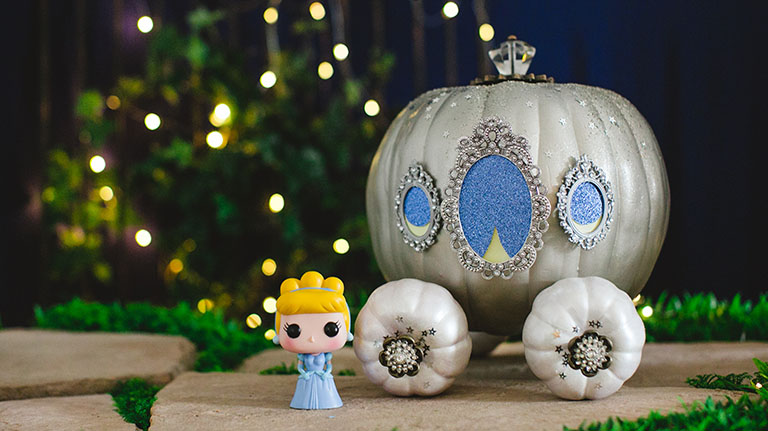
Materials needed:
  • 1 medium pumpkin (to reuse next year, use artificial pumpkin)
  • 4 small pumpkins (to reuse next year, use artificial pumpkins)
  • Acrylic paint: silver, white
  • Mini picture frames (optional)
  • Glittery card stock (optional)
  • Provided window template (click here to download)
  • Silver glitter
  • Decorative silver finial
  • Glue

Step 1

Paint your Cinderella pumpkin silver.

Step 2

Glue mini picture frame windows and glittery card stock curtain shapes on one side. (Or you can download this template, color and affix it to the pumpkin.)

Step 3

Paint four smaller gourds white and decorate with glitter and silver accents.

Step 4

Skewer the smaller gourds to create wheels, attaching two on each side of the pumpkin.

Step 5

Dust your creation with glitter and top the whole thing off with a decorative finial for a stem. And don’t forget to redeem your Disney Rewards Dollars toward some Cinderella merchandise to place next to her carriage!1

Maleficent

Every Halloween needs a villain, and this Mistress of Evil fits the bill without scaring off the neighbors. This glaring gal will be happy to stare down late-night trick-or-treaters long after your little Sleeping Beauties have gone to bed.
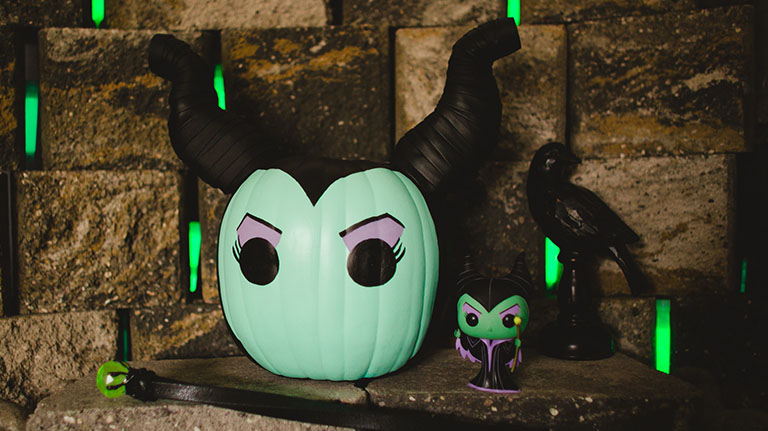
Maleficent pumpkin
Materials needed:
  • 1 medium pumpkin (to reuse next year, use artificial pumpkin)
  • Acrylic paint: light green, lavender, black
  • Provided face template (click here to download)
  • Styrofoam
  • Leather ribbon
  • Hot glue

Step 1

Cut off the stem and paint your pumpkin green and black. Follow the above photo to create the widow’s peak with black paint.

Step 2

Paint on Maleficent’s face with black and lavender. You can download this tracing template to help you with the shapes.

Step 3

Cut styrofoam into horn shapes and wrap them in leather ribbon.

Step 4

Hot glue the horns onto the pumpkin for a sinister finishing touch. Make sure an adult is present when handling hot glue.


We hope you enjoy these no-carve Disney pumpkin painting ideas. Happy Halloween!

1Disney Rewards Dollars

Disney Rewards Dollars are subject to the Disney Rewards Dollars Terms and Conditions for Disney Visa Credit Cards available at DisneyRewards.com/Terms.

2$300 Disney Gift Card eGift with the Disney Inspire Visa Card

This product is not available to either (i) current cardmembers of this credit card, or (ii) previous cardmembers of this credit card who received a new cardmember bonus for this credit card within the last 24 months. Upon approval of your Disney Inspire Visa Card application, you will be sent your Disney Gift Card eGift via email within hours to any valid email address. The Disney Gift Card eGift can be used at select participating locations at Walt Disney World® Resort, Disneyland® Resort, Disney Cruise Line, Disney Store locations in the U.S., DisneyStore.com, and Adventures by Disney®. Disney Gift Card eGifts are redeemable for goods and services at participating Disney locations. Disney Gift Card eGifts are not refundable or redeemable for cash unless required by law. Disney Gift Card eGifts are not for resale. Disney Gift Card eGifts are issued by, and represents a legal obligation solely of, Disney Gift Card Services, Inc. Lost, damaged or stolen Disney Gift Card eGifts may be replaced only if original email and complete card number are provided. For Disney Gift Card eGift balance inquiries, call 1-877-650-4327 or visit DisneyGiftCard.com. For complete terms and conditions (including arbitration agreement), visit DisneyGiftCard.com. The value of this offer or program may result in miscellaneous income received from Chase and we may be required to send you, and file with the IRS, a Form 1099-MISC (Miscellaneous Information) or Form 1042-S (Foreign Person's U.S. Source Income Subject to Withholding) for the year in which you participate and are awarded the benefits of the offer/program. You are responsible for any tax liability related to participating in the offer/program. Please consult your own tax advisor if you have any questions about how this could affect your taxes. Chase is not responsible for the provision of, or failure to provide, the stated benefits and services. All trademarks are property of their respective owners. If your account is not open for at least 6 months, Chase and Disney reserve the right to cancel the Disney Gift Card eGift.

3$300 Statement Credit with the Disney Inspire Visa Card

This product is not available to either (i) current cardmembers of this credit card, or (ii) previous cardmembers of this credit card who received a new cardmember bonus for this credit card within the last 24 months. Offers may vary and may not be available through all application methods when applying for the Disney Visa Credit Cards. In some instances, an application may require additional time to process. To qualify and receive your $300 statement credit, you must make Purchases totaling $1,000 or more during the first 3 months from account opening. ("Purchases" do not include balance transfers, cash advances, travelers checks, foreign currency, money orders, wire transfers or similar cash-like transactions, lottery tickets, casino gaming chips, race track wagers or similar betting transactions, any checks that access your account, interest, unauthorized or fraudulent charges, and fees of any kind, including an annual fee, if applicable.) To be eligible for this bonus offer, account must be open and not in default at the time of fulfillment. After qualifying, please allow up to 8 weeks for your credit to appear in your statement.

Clicking on the Facebook, Pinterest and other third-party links will take you away from our Disney site where different terms of use and privacy policy apply.

The Contactless Symbol and Contactless Indicator are trademarks owned by and used with the permission of EMVCo, LLC.

Deposit and credit card products provided by JPMorgan Chase Bank, N.A. Member FDIC